EN
EN  ID
ID 


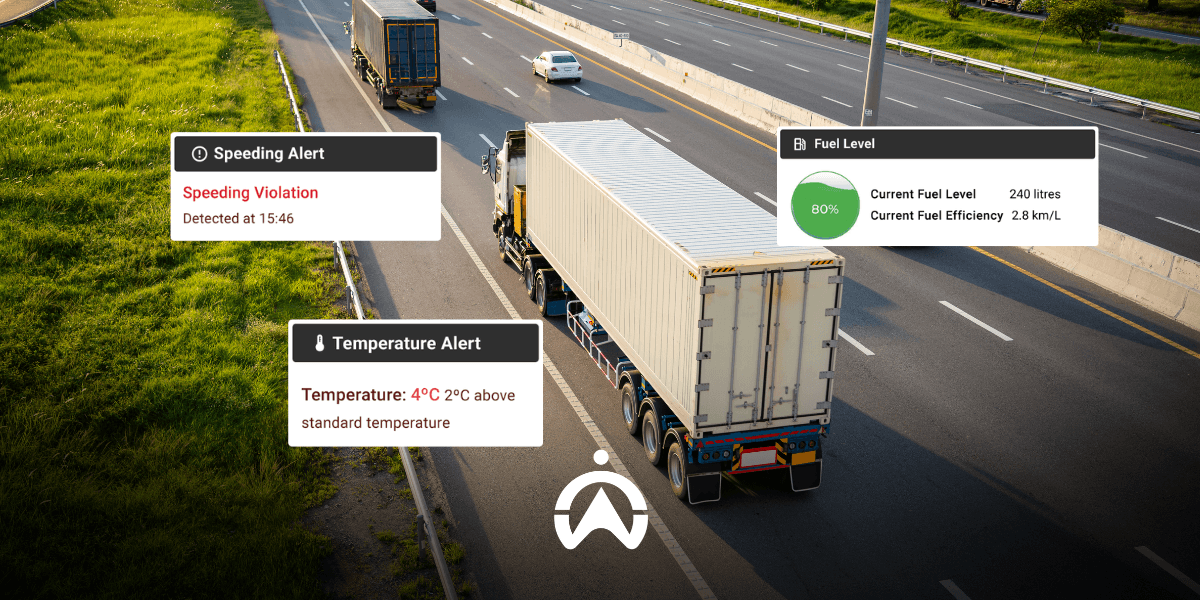
To ensure smooth fleet operations and business continuity, you need to anticipate emergency situations that may occur while vehicles are on the road. Some emergency situations you can prepare for include vehicle theft, robbery, and accidents. Using the fleet management system Cartrack with its wide range of features can help you manage these situations effectively.
One of the most important features for anticipating emergency situations is automatic notifications or alerts, which can be sent via email, SMS, and push notifications. You can customise the types of notifications you wish to receive, apply them to specific vehicles, and set the notification delivery time range. What types of notifications does Cartrack provide to help anticipate emergency situations? Take a look at the explanation below.
1. Aggressive Driving Behaviour
Prevent road accidents caused by driver negligence by enabling aggressive driving notifications. Set notifications for certain aggressive driving parameters that are important to you, such as excessive speed, sudden braking, and sharp turns (especially useful for trailer trucks).
2. Excessive Driving Time
Based on Article 90 of the Republic of Indonesia Law Number 22 of 2009 concerning Road Traffic and Transportation, drivers are required to rest after driving continuously for 4 hours. This is intended to prevent fatigue while driving, which increases the risk of accidents. Ensure your drivers do not drive excessively by applying a 240-minute (4-hour) driving time limit alert to all your vehicles through Cartrack Fleet Web.
3. Route
On Cartrack Fleet Web (a web-based fleet management software), there is a route planner feature that allows you to plan daily routes for each vehicle based on trip history. You can also set notifications to help anticipate emergency situations, such as potential hijacking, theft, and vehicle damage. These notifications include route deviations, route cancellations due to excessive deviation, slow route progress, and routes not starting within a specified period of time.
4. Panic
With the additional panic button feature from Cartrack installed in the vehicle, drivers can send alerts when caught in emergency situations, such as robbery, accidents, or disasters. To help prevent greater losses, the fleet operator on duty can immediately dispatch assistance to the location tracked by the Cartrack GPS tracker.

5. Geofence
Before setting up geofence notifications, you need to create a virtual perimeter on the map for the area you wish to monitor. Geofence notifications will alert you whenever a vehicle (to which this notification has been applied) enters and/or exits the designated area. This notification helps you anticipate situations where a vehicle enters a restricted area or leaves your operational boundaries.
6. Movement
Cartrack can detect when a vehicle is moving with the engine off and sends a notification after the vehicle has moved more than 5 meters. Moving more than 5 meters with the engine off can indicate a towing attempt, either due to a traffic violation or vehicle theft. Both of these incidents should be anticipated to minimise losses and ensure smooth fleet deployment.
7. Power outage
Enable power disconnection notifications to be informed whenever the Cartrack GPS tracker is disconnected from the vehicle battery power supply. This way, if there is battery or vehicle theft, where the thief disconnects the battery or GPS tracker, you will be alerted immediately.
8. Fuel Loss
Fuel theft can occur while a vehicle is parked or while the driver is resting before continuing the journey. A significant loss of fuel can delay task completion, which affects the smooth running of your business. In addition, cargo theft may also occur (especially for open-bed trucks) if the vehicle breaks down on the road due to running out of fuel. Fuel loss notifications (available only for vehicles equipped with the Cartrack fuel sensor help ensure smooth and efficient journeys.
9. Temperature
Food and beverage deliveries using refrigerated cargo vehicles require temperature monitoring. Temperature notifications (available only for vehicles equipped with Cartrack temperature sensors) are very useful for ensuring that food and beverages being transported do not spoil during transit. Temperature alerts are triggered when cargo temperatures exceed the upper and lower tolerance limits that you have set.
Anticipate emergency situations during trips to minimise the risk of losses with the wide range of notifications Cartrack provides. Cartrack’s fleet management system gives you full visibility over fleet activity, helping you ensure vehicle journeys are safe, drivers remain protected, and your business runs smoothly. Enhance your risk management for on-the-road emergencies with Cartrack—contact us now!